
Firm profile and logo
For owners and admins · 1 min read
Set the firm’s name, address, logo and time zone, which print on every workpaper and date every record.
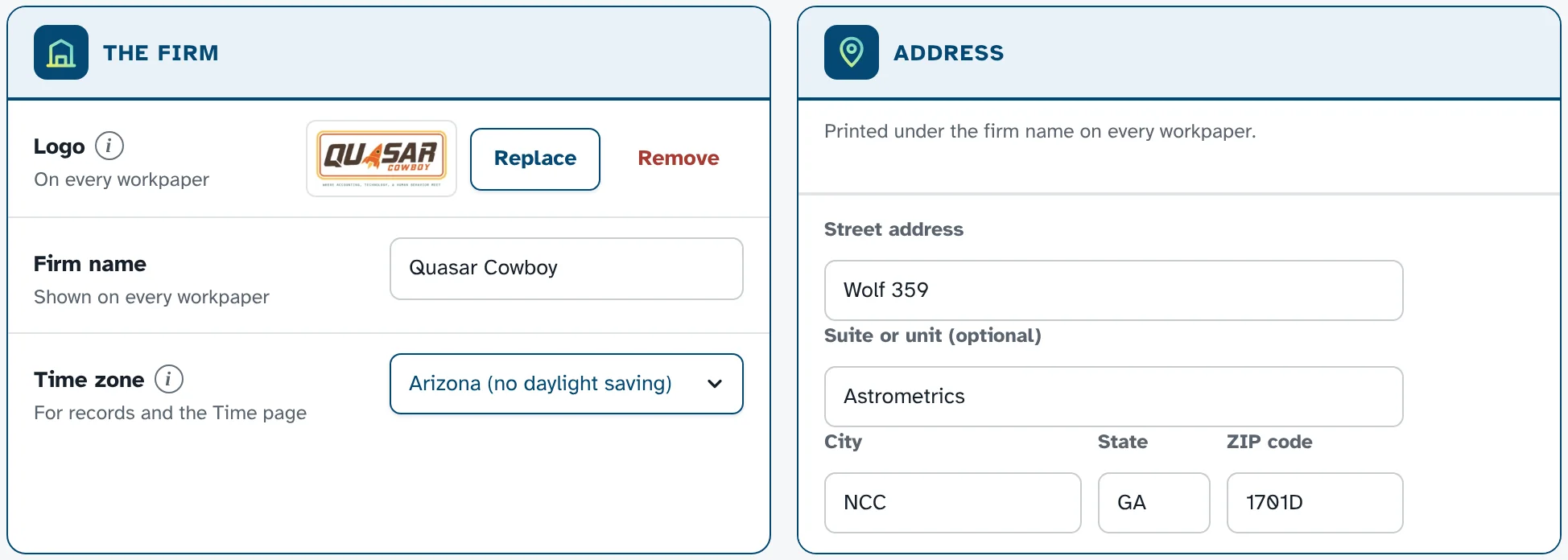
- 1Open Settings › Firm profile.
- 2Click Upload a logo (or Replace) and choose a PNG, JPG or WebP. It saves as soon as it’s uploaded.
- 3Check the Firm name. It’s printed on every workpaper.
- 4Fill in the Address: country (United States unless you’re abroad), street, suite, city, state and ZIP code.
- 5Choose the firm’s Time zone. Everything saves when you leave the box.
 2345
Good to know
- A big logo is made smaller to fit. Workpapers already signed off keep the logo they were signed with.
- Remove takes the logo off; workpapers show the firm name instead until you upload another.
- Firm settings are six pages: Firm profile, Team, Deadlines and time, Security and compliance, Integrations, and Messages and broadcasts. Owners and admins change them; tax managers also run Team and Messages and broadcasts.
- Everyone else can read them and click Ask for a change.
- Every change is recorded in the audit trail, old and new value.
- Ownership of the firm’s TaxReview2Do account is at the bottom of this page; see Hand the firm to a new owner.