
Set due dates and Start by rules
For owners and admins · 2 min read
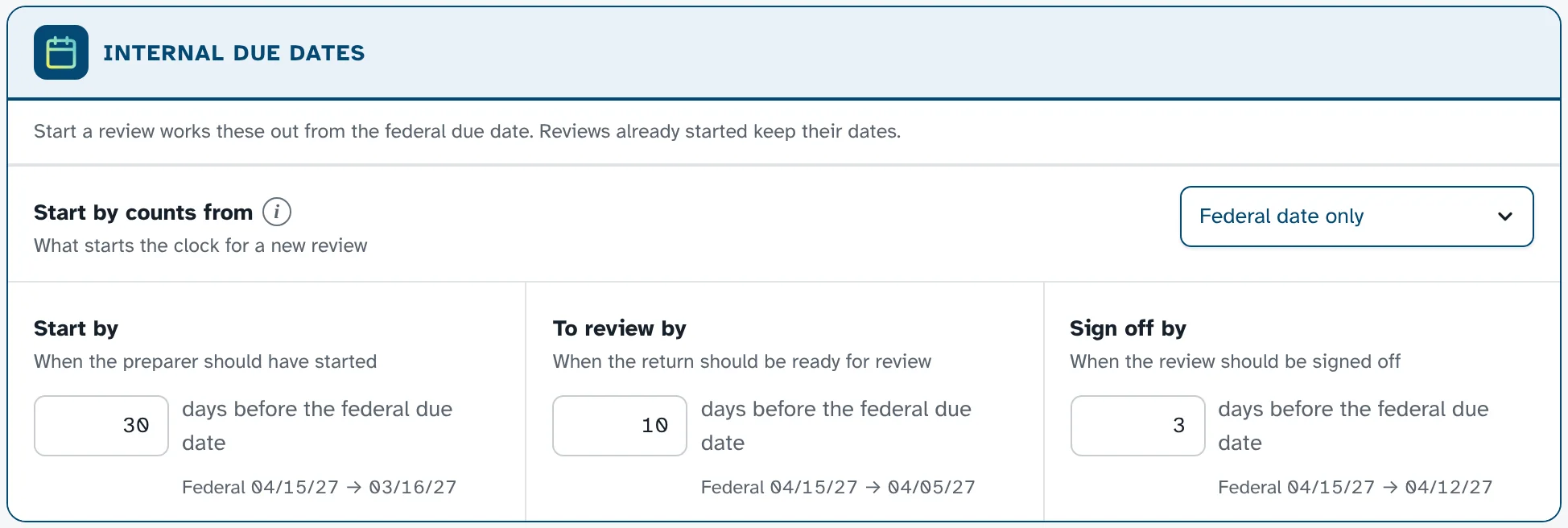
Set when each new review should be started, in the review queue and signed off, counted from its federal due date.
- 1Open Settings › Deadlines and time.
- 2In Internal due dates, choose what Start by counts from: Federal date only, Documents in, Engagement letter signed, Date assigned or Manual decision.
- 3Type the days for Start by, To review by and Sign off by. The example under each box shows the date it gives for an April 15 return.
- 4In Penalty risk, set the Penalty-risk window: how close to the federal due date an unsigned review shows as at risk.
- 5In Untouched, set While preparing and With the reviewer: how many days with nothing saved before Home flags a review at that stage.
 23
Good to know
- You don’t type the federal due date: each review works it out from its form, tax year and year end, and moves it when you mark an extension filed.
- Documents in, Engagement letter signed and Date assigned start the clock that many days after that day, but never later than the Start by days before the federal date.
- Documents in is the day the last document on the review’s documents list is checked received, or a date typed when the review is started.
- Manual decision suggests a Start by date that whoever starts the review can change.
- The days must run in order: Start by, then To review by, then Sign off by. Changes save on their own and only apply to new reviews; reviews already started keep their dates.
- Starting values: Start by 45 days, To review by 14, Sign off by 5, Penalty risk 14 days, Untouched 14 days while preparing and 7 with the reviewer. Every change is in the audit trail.
- Once a federal due date passes and the review isn’t signed off, its preparer and reviewer (who signs it off) are told the next day; with no reviewer yet, whoever names one is told. The review shows Past due · no extension filed until you mark the extension filed.