
The five types of open item
For everyone · 1 min read
Every open item is one of five types, each with its own color, so a list tells you at a glance what kind of work is left.
An open item is anything that has to happen before a review can be signed off. Each one has a type, and the type’s color edges its row and fills its tag everywhere you see it.
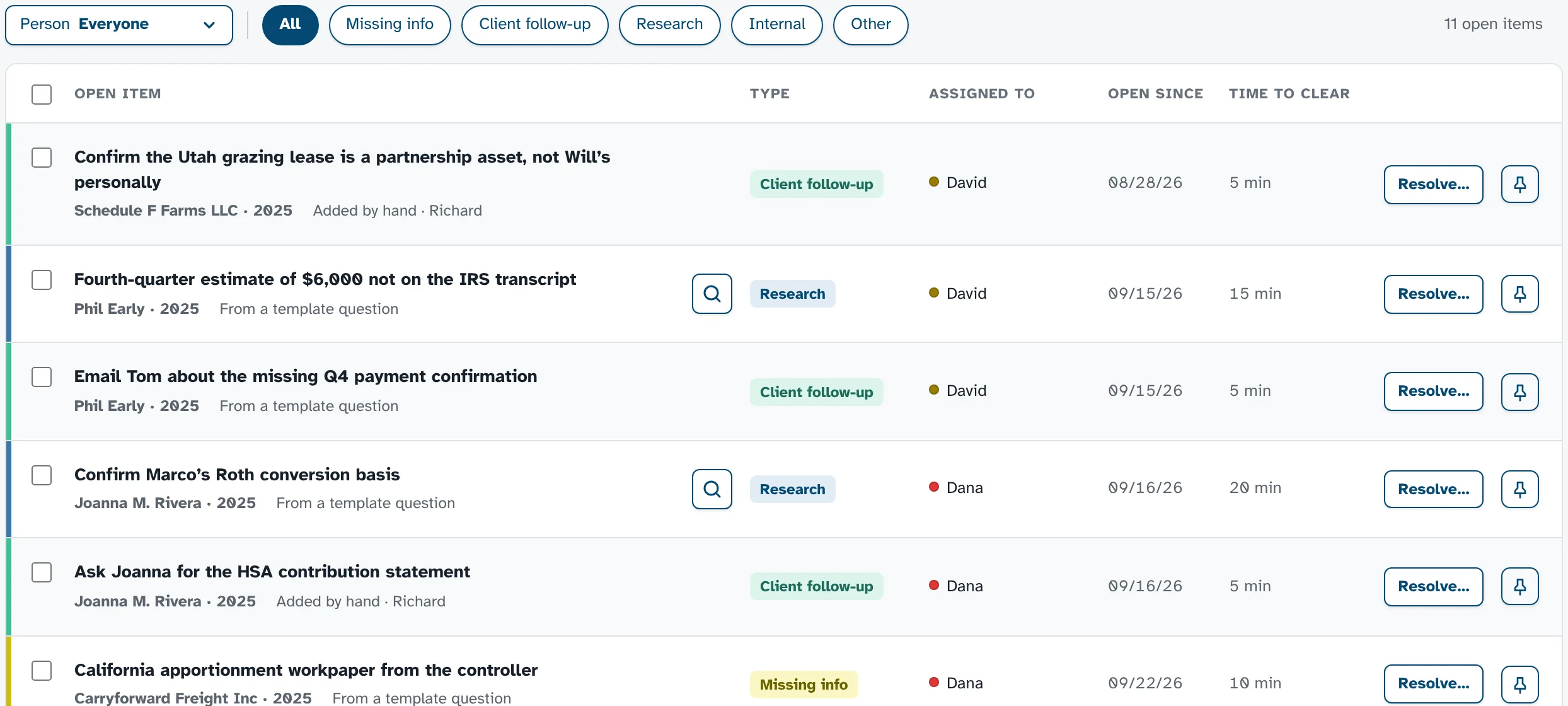
- Missing info (yellow): a document or number you don’t have yet, like the second W-2 for Ira Roth.
- Client follow-up (mint): something to ask the client, like the HSA contribution statement.
- Research (navy): a question to look into. Its row has your tax research tool’s icon beside the tag.
- Internal (gray): work inside the firm, like re-running diagnostics after a fixed asset import.
- Other (white with a dashed edge): anything else. It always carries a short description on its tag, like “Other · K-1 partnership”.
Where they come from
- Added by hand: anyone in the firm adds one with ⊕ Add an open item. Its row says who added it.
- From a template question: added from a question’s panel, so it’s linked to that question.
- From the answers: the review makes these itself. A document on a list not yet received is Missing info, and a blank research note that a follow-up needs is Research. Answer the question, or click Mark received, and they close.
- From a send-back: each line of a reviewer’s notes becomes an open item for the preparer.
Good to know
- Sign-off waits until every open item, of every type, is resolved.
- Items from the answers can’t be checked for bulk actions or Quick win; answering is how they close.
- Filter the Open items tab by type with the chips, All types first.
- Turn on Red-green safe colors in Look and feel if yellow and mint are hard to tell apart.