
Turn on keyboard shortcuts
For everyone · 1 min read
Every shortcut is off until you check it, so you only get the keys you want.
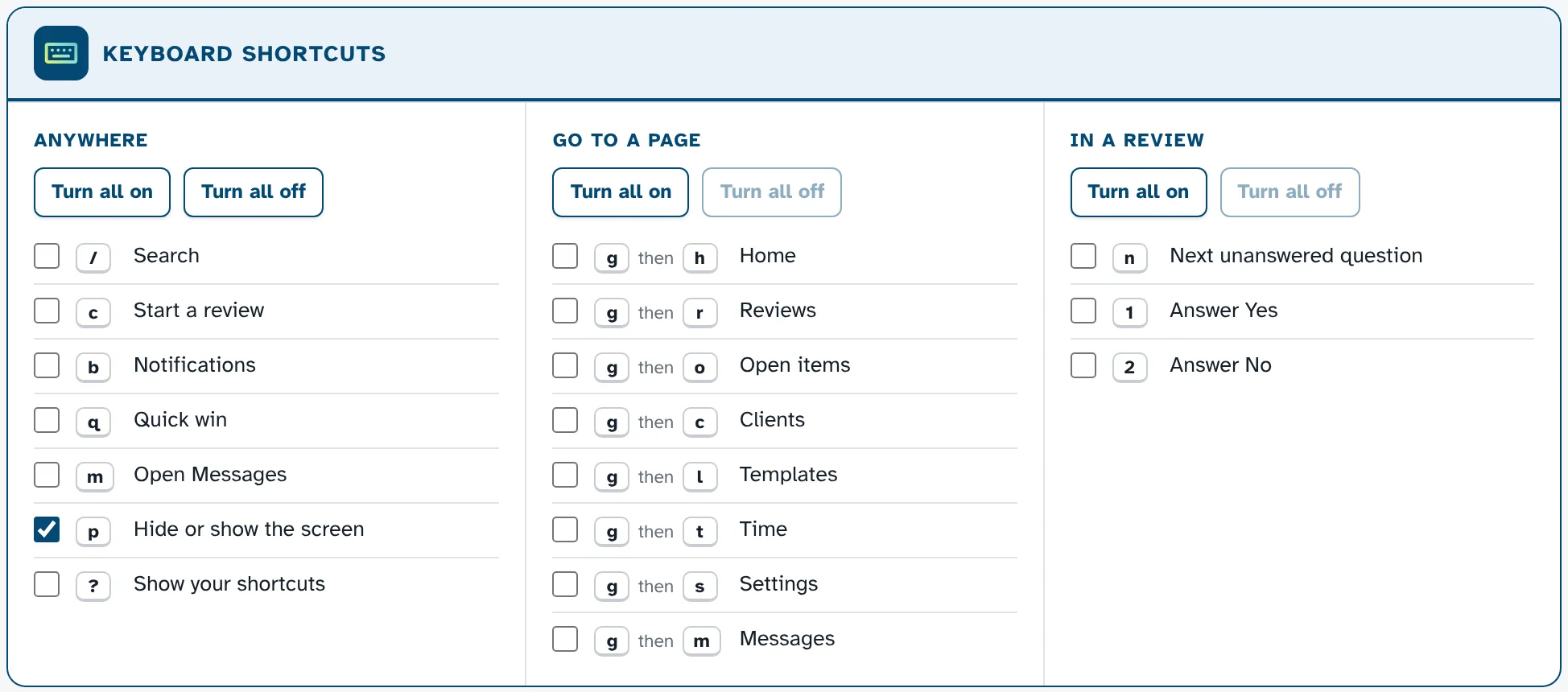
- 1Open Settings › Apps and integrations and scroll to Keyboard shortcuts.
- 2Check each shortcut you want. It works straight away.
- 3Click Turn all on under a group (Anywhere, Go to a page, In a review) to take the whole group.
- 4Check Show your shortcuts, then press ? anywhere to see the ones you’ve turned on.
 23
Good to know
- Anywhere: / search, C start a review, B notifications, Q Quick win, M Messages, P hide the screen, ? your shortcuts.
- Go to a page: G, then H Home, R Reviews, O Open items, C Clients, L Templates, T Time, S Settings, M Messages.
- Only P starts on. Turn all off clears a group.
- Shortcuts never fire while you’re typing in a box, or with Ctrl, ⌘ or Alt held down.
- Once a shortcut is on, its key shows beside what it does, like “Quick win (Q)”. Your choices follow you to any computer.