
Comment and @mention someone
For everyone · 1 min read
Leave a comment on a question and @mention a coworker so they’re told.
- 1Open the review and click the question you want to talk about.
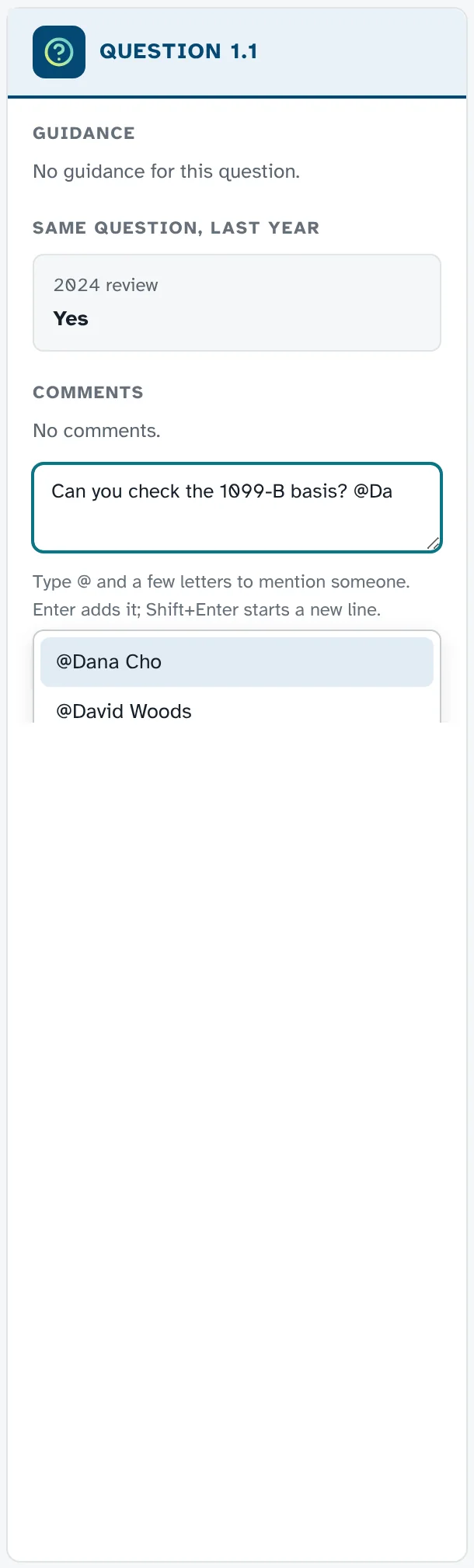
- 2In the Question panel on the right, type your comment in Add a comment.
- 3To mention someone, type @ and a few letters of their name, then pick them from the list.
- 4Press Enter or click Comment. Shift+Enter starts a new line instead.
Good to know
- The people you mention get a notification on the bell. The review’s preparer and reviewer are told about every comment.
- Only people who have joined the firm can be mentioned, and never yourself.
- You can comment while someone else is editing the review. Comments close once it’s signed off.
- Point at a comment to react with an emoji, if your firm has Emoji on review comments on.
- The question shows how many comments it has, and the Sign-off tab lists each answer with its comments under it.
- Comments aren’t printed on the workpaper.
 24