
The bell
For everyone · 1 min read
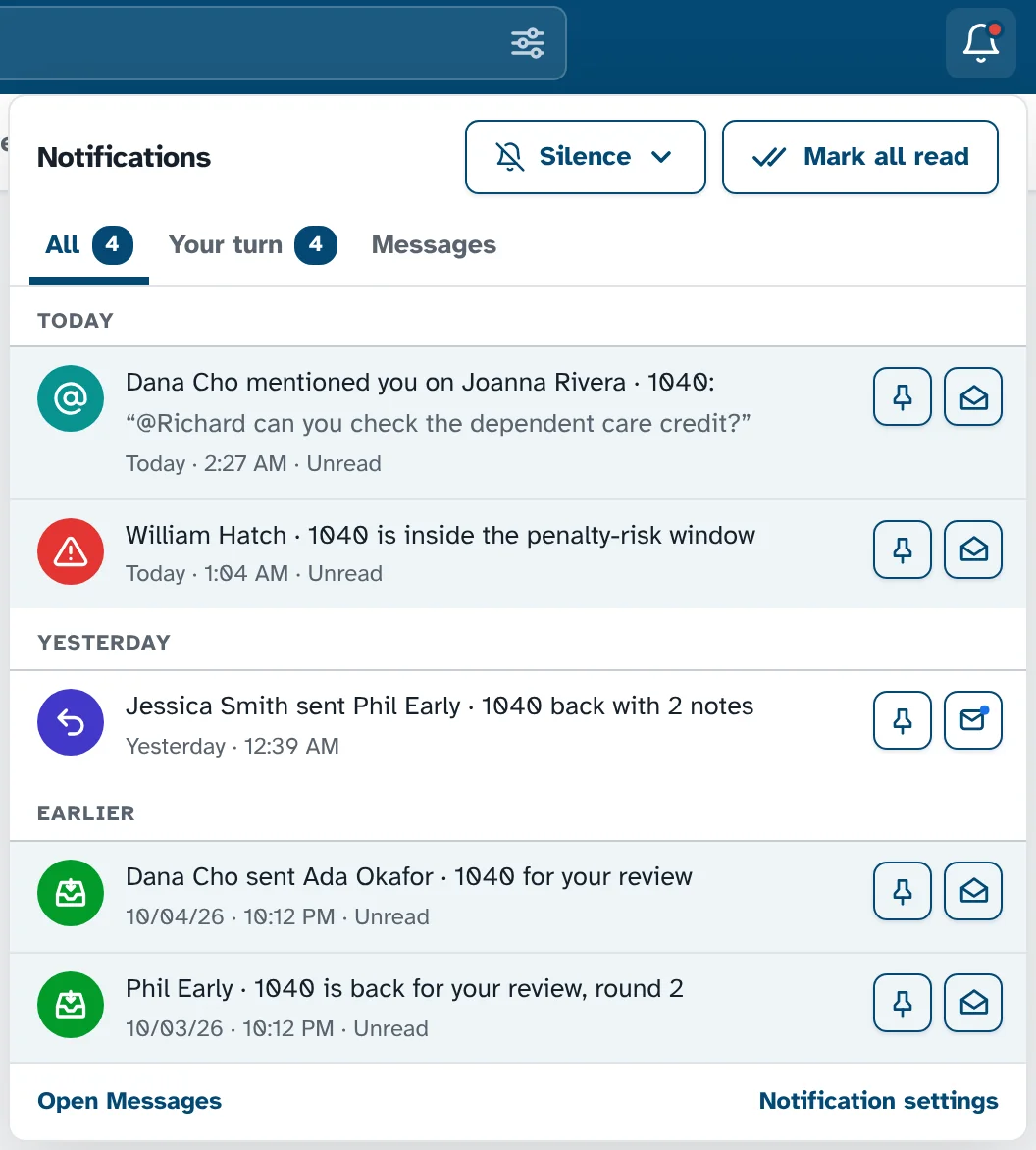
The bell is the one place for everything that needs you: review notifications and the messages waiting on you.
- 1Click the bell in the navy row at the top of every page.
- 2Pick a tab: All (every notification, plus every unread conversation), Your turn (reviews that need you, read or not) or Messages (every unread conversation).
- 3Click a notification to open its review. It’s marked read.
- 4Use the buttons at the end of a row: the pin keeps it at the top, the envelope marks it read or unread.
- 5Click Mark all read to clear the tab you’re on.
Good to know
- You hear about your turn, @mentions, comments, open items, sign-offs, penalty risk and dates, plus broadcasts and requests to change a firm setting.
- Never about your own actions.
- To stop a kind reaching the bell, uncheck its Bell box in Settings › Notifications › What reaches you. Broadcasts always come through.
- A slash on the bell means quiet hours, Silence, or notifications turned off. They still collect here.
- Notification settings at the foot of the bell opens Settings › Notifications.
- If your firm has turned Messages off, the bell has just All and Your turn.
 124