
Priority clients and which return goes first
For everyone · 1 min read
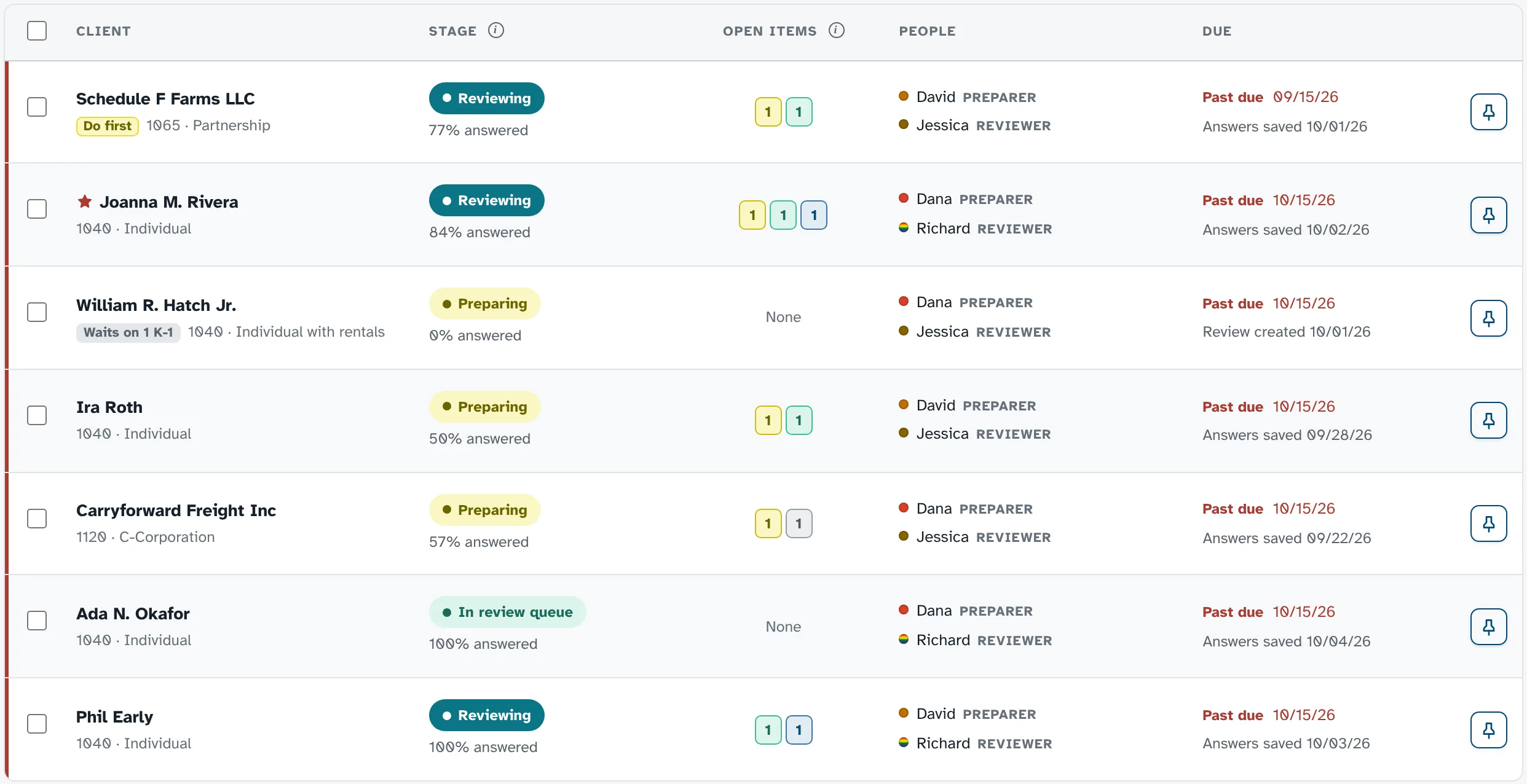
Mark the one client that comes first and the ones that matter most, and let a company’s K-1 go before the owner’s return that waits on it.
- 1A gold flame in front of the name marks a Top priority client. A firm can have up to five. Their reviews come before everything, your pins included.
- 2K-1 to W. Hatch (the owner’s name) shows on a company’s review when it sends a K-1 (an S corporation or partnership) to an owner whose return for the same year isn’t signed off. The owner’s review says Waiting on 1 K-1.
- 3A red star marks a High priority client. Mark as many as you need.
- 4Reviews and Home list Top priority, then your pins, then companies whose K-1 an owner waits on, then High priority, then the rest by due date.
 12
Good to know
- A company owned by another company names it under Edit client › Owned by a company, with the share owned. The company page then says who owns it and what it owns.
- A company’s K-1 goes to the company that owns it, or else to the person it’s linked to.
- Clients has a Priority clients filter once your firm has starred one.
- Every star change and owner change goes in the client’s audit trail.