
The client page
For everyone · 1 min read
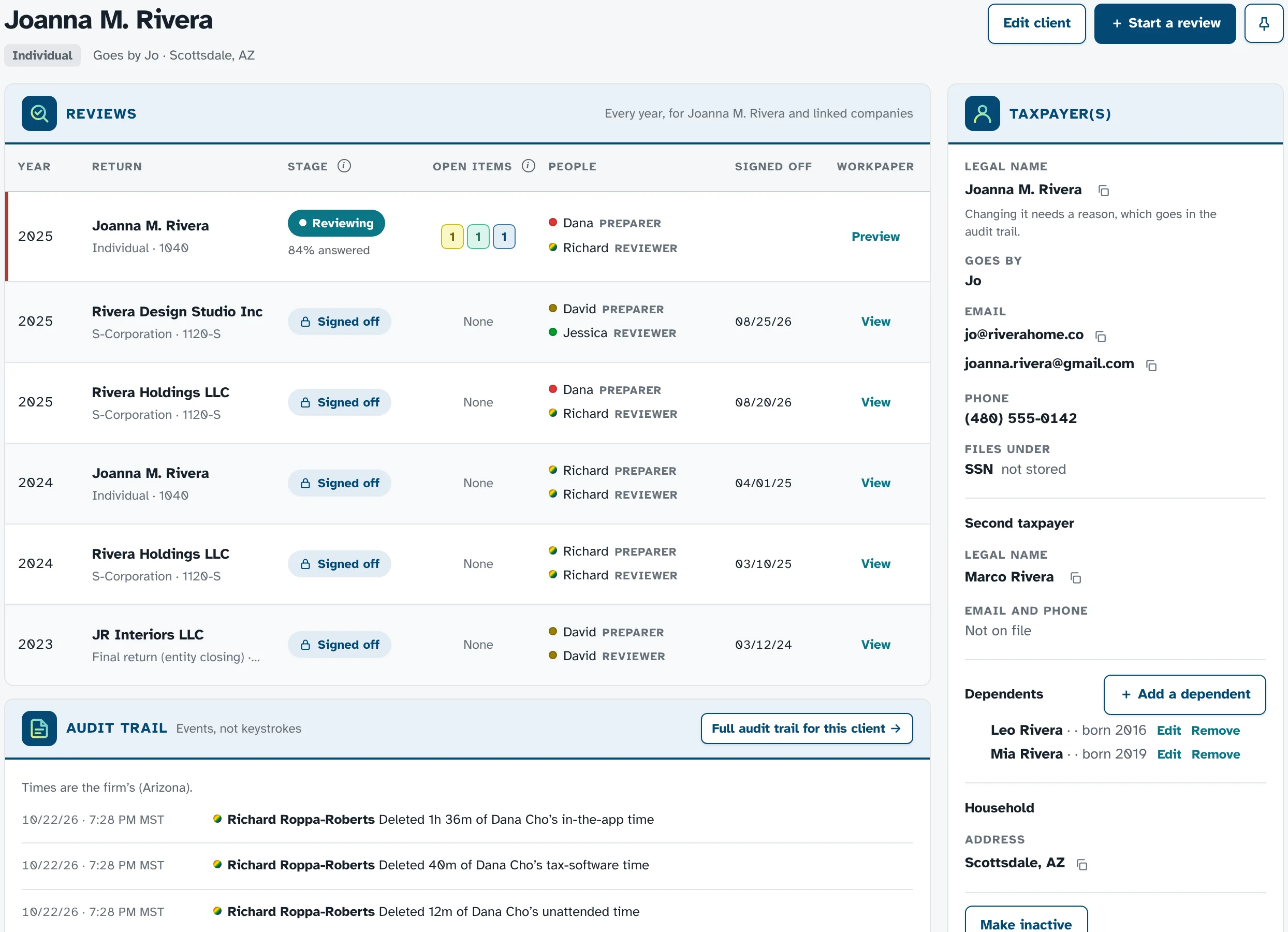
One page per client with every review year by year, the taxpayers’ details, linked companies and the client’s audit trail.
- 1Go to Clients and click a client’s row.
- 2Read Reviews: every year, newest first, with its stage, open items, people, sign-off date and workpaper. A person’s page lists their linked companies’ reviews too; a company’s page lists only its own. Click a row to open that review.
- 3Check Taxpayer(s) (or Entity facts for a company): legal name, emails, phone, address and, for individuals, the second taxpayer and dependents.
- 4Use Linked to jump between a person and their companies. + Link a company adds a new company under this person.
- 5Click Edit client to change details, or + Start a review to begin a new year.
Good to know
- The Audit trail panel shows the latest 12 events for this client; Full audit trail for this client → shows them all.
- A person with linked companies can choose how they show in the client picker, under Picker name. A company with a DBA chooses between its legal name and its DBA there.
- Former names are kept and listed under the legal name.
- A client linked to TaxDome shows Open this client in TaxDome ↗ at the top, once your firm has saved its TaxDome address.
- Make inactive and Delete client sit at the foot of the details panel: see Make a client inactive, or delete one.
 23