
Fix a time entry
For everyone · 1 min read
Move a session to the right review, shorten one left running, or mark unattended time billable; every fix is recorded.
- 1Click Time in the tab row.
- 2Under Where the time went, click Sessions (or start from a session listed in Worth a look).
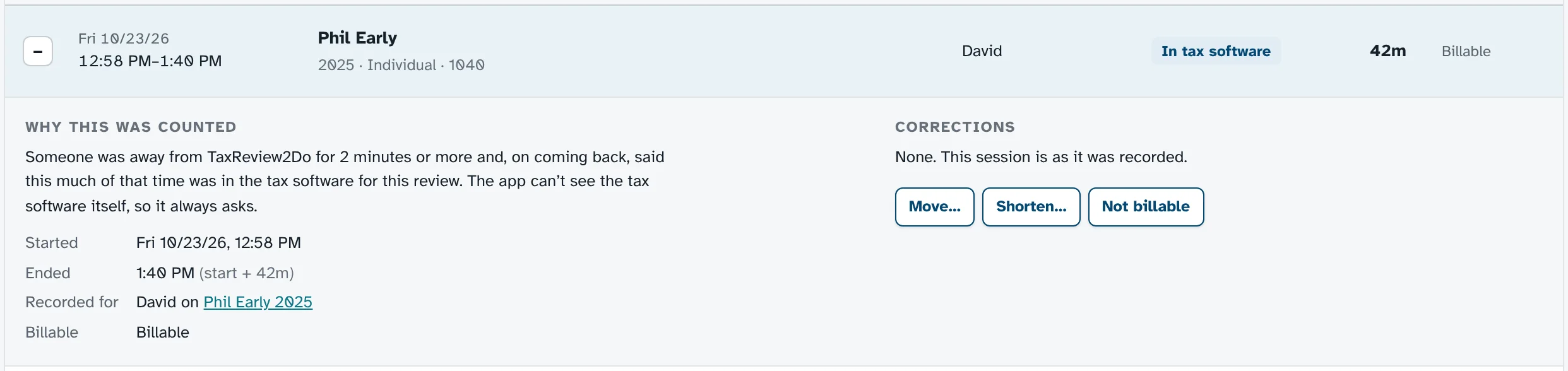
- 3Click + beside the session to see why it was counted and what’s changed since.
- 4Click Move… to put it on another review, Shorten… to cut its end, or Billable / Not billable.
- 5Add why if you like, then click Move or Shorten to with the new length.
 34
Good to know
- Anyone can fix a session, their own or a teammate’s. Each fix goes in the audit trail with your name, the time and any reason.
- A move is recorded on both reviews’ activity.
- Shortening keeps the start time; the end moves earlier.
- Time can move onto a signed-off review; the review stays locked.