
Change what a role can do
For owners and admins · 1 min read
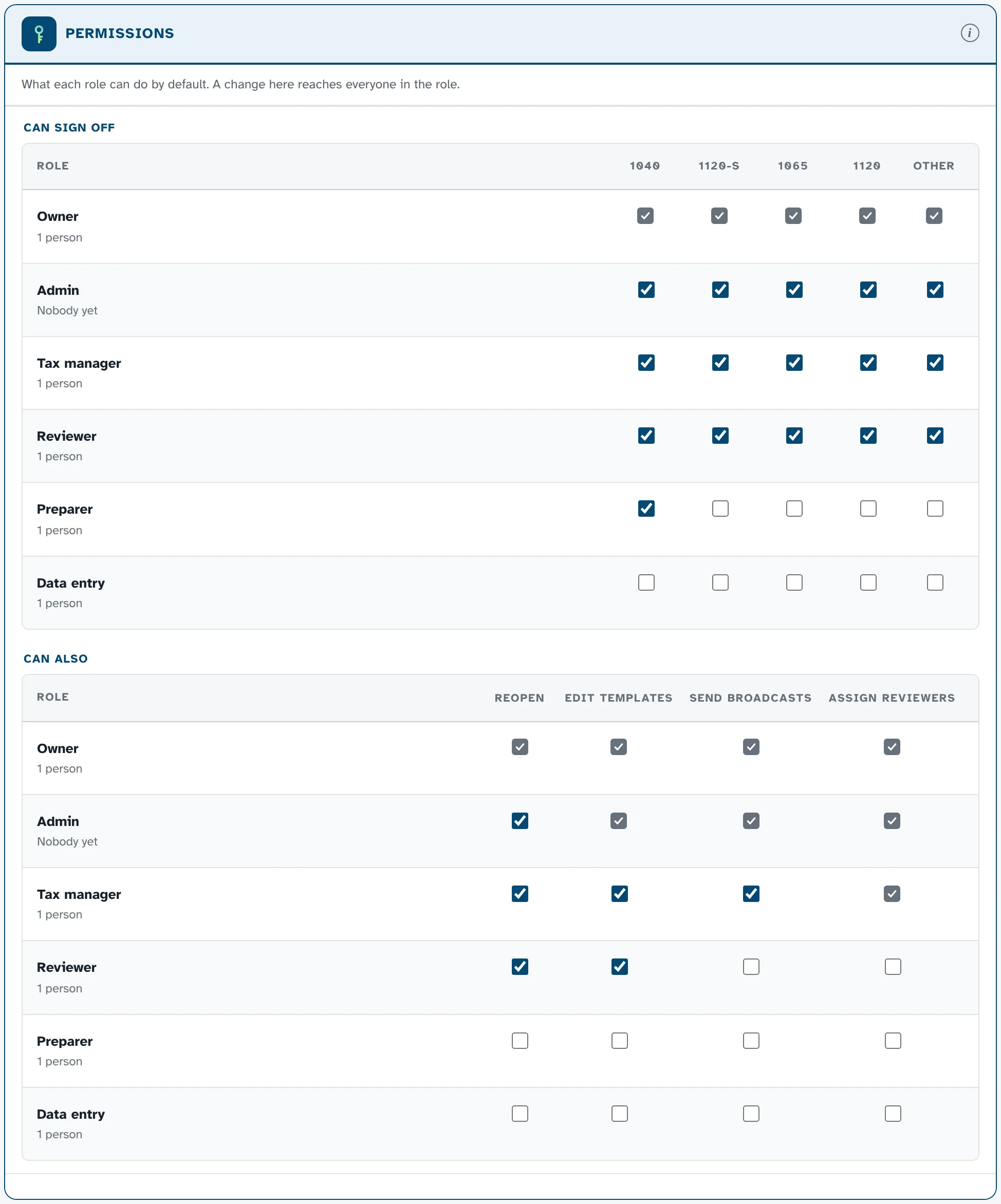
Choose which forms each role signs off and whether it can reopen, edit templates, send broadcasts and assign reviewers.
- 1Open Settings › Team.
- 2Scroll to Permissions at the bottom (or click Permissions in How roles work).
- 3Under Can sign off, check or uncheck a form for a role, for example 1120-S for Preparer.
- 4Under Can also, check or uncheck Reopen, Edit templates, Send broadcasts or Assign reviewers.
- 5That’s it: each change saves as you make it and reaches everyone in that role at once.
Good to know
- “Other” covers any template that isn’t one of the four forms.
- If no role can sign off a form, a yellow note says so: reviews on that form can’t be finished until one can.
- Locked boxes are rights a role always has: owners everything; admins edit templates, send broadcasts and assign reviewers; tax managers assign reviewers.
- Only owners and admins change Permissions. Everyone else sees it read-only.
- Every change goes in the audit trail, one line each, such as “Preparer can now sign off 1120-S returns”.
- For one person instead of the whole role, give them a Plus.
 34