
Change several reviews at once
For owners, admins, tax managers, tax admins, reviewers and preparers · 1 min read
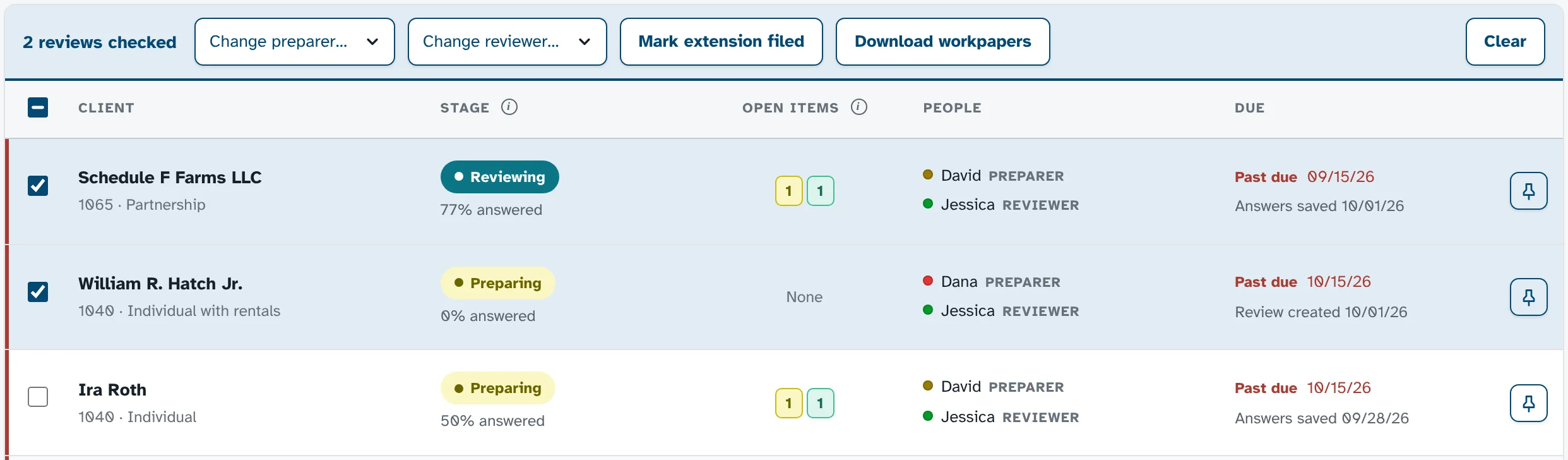
Check several reviews on the Reviews list to change their preparer or reviewer, mark extensions filed, or download their workpapers together.
- 1On Reviews, filter the list down to the reviews you want. The checkboxes are in Rows view.
- 2Check each review, or check the box in the heading row to check every one showing.
- 3In the bar that appears, pick from Change preparer… or Change reviewer…, or click Extension or Download workpapers.
- 4Read what will change and click to confirm. A note says how many changed and which were skipped.
 23
Good to know
- Reviews someone is editing right now are skipped, and the note says so.
- Signed-off reviews only download; their people and dates don’t change.
- Each review changes on its own, so each one gets its own line in the audit trail, and the new preparer or reviewer is told.
- If your firm asks for a reason for reassignments, you give one reason for the whole batch.
- Change reviewer… shows only to people who can assign reviewers.
- The list’s tabs: Your turn (where the next step is yours), Not signed off, Signed off and All. Signed-off rows show where each return is in filing: Sent to client, 3 of 4 filed, Completed.